Version 2.0.0 - December 2025

FreeDS Smart Manager for Solar Surplus

Universal and automatic control of solar surplus energy.
Compatible with 25+ inverters · Home Assistant · MQTT

25+
Inverters
2.0.0
Latest Version
100%
Free to Use
Scroll
Features

What's New in Version 2.0.0

Released on December 23, 2025

🌡️

Temperature Control

  • Configurable temperature commands
  • Adjustable hysteresis
  • Automatic activation
  • Range down to -30°C
🏠

Home Assistant

  • Auto Discovery via MQTT
  • Target power publishing
  • Simplified relay topics
  • Advanced automations
Ibepower

Cloud Access

  • Historical data visualization
  • Remote manager control
  • Access from anywhere
  • Preview control dashboard
🔧

Technical Improvements

  • Message storage
  • Optimized PWM
  • HTTP optimizations
  • Activation system
⚠️

Activation System

Starting with v2.0.0, FreeDS requires an activation key for use.

FreeDS does not sell or supply pre-assembled surplus managers. It only provides official PCBs designed by @amcalo for self-assembly by users.

If you purchased a surplus manager after 12/23/2025, ask your seller to provide the activation code.

Users who contributed via donations, purchased the official PCB, or assembled the manager themselves have access to free activation.

Contact: derivadorfreeds@gmail.com

🚫

Official FAQ: Solares TV and third-party managers

If you arrived searching for Solares TV, this is the official FreeDS clarification to avoid brand and support confusion.

FreeDS does not offer an official pre-assembled manager. FreeDS is a firmware/project, and the official commercial option developed by the creators is Ibediv (Ibepower).

Sellers such as Solares TV and others market non-official managers assembled and sold by them, without relation to the FreeDS author.

In many online stores it is not clearly stated that the creator of the FreeDS surplus manager is Pablo Zerón, and that those sellers only assemble and sell the required hardware.

For Solares TV and other non-official sellers, support and updates to versions requiring an activation key must be handled by the seller; otherwise, contact us to learn about available options.

For searches such as "FreeDS Solares TV", "FreeDS manager Solares TV" or "alternative to Solares TV", always check official channels for updated information.

The FreeDS usage license requires explicit disclosure that the device uses FreeDS and acknowledgement of the original author; when this is not clearly stated, the license is not met.

For community support you can use the official channel: FreeDS Telegram.
Commercial Version

🏢 Commercial Version Available

For users who prefer a ready-to-use solution with minimal installation

Ibediv - Solar Energy Diverter

The creators of FreeDS, under the commercial brand Ibepower, have developed a commercial version of the manager for users who want a fully configured, tested, and ready-to-use device, with simplified installation, advanced functions compared to FreeDS, and included technical support.

✓ Easy setup
✓ Simplified DIN rail installation
✓ Technical support included
✓ Customizable Schedule Programmer
✓ Compatible with smart plugs (Ibeplug)
✓ Premium Cloud Access

Solution created by the FreeDS team

Compatibility

Compatible Hardware

Compatible with more than 25 different inverters and meters

New

Kostal Pico

New

Deye Hybrid

New

Enphase Envoy V7

New

Shelly Pro 3EM

New

Shelly Pro EM 50

New

Ibemeter

New

Ibediv

New

FreePocket

New

Onofre HAN

New

ICM Solar

New

Fox ESS

New

Sofar HYD

Solax WiFi v1/v2

Fronius

SMA Sunny Boy

Huawei

Goodwe

Ingeteam

SolarEdge

Shelly EM

Wibeee

Victron

MQTT Server

DDS238-2 / SDM120

Assembly

Assembly

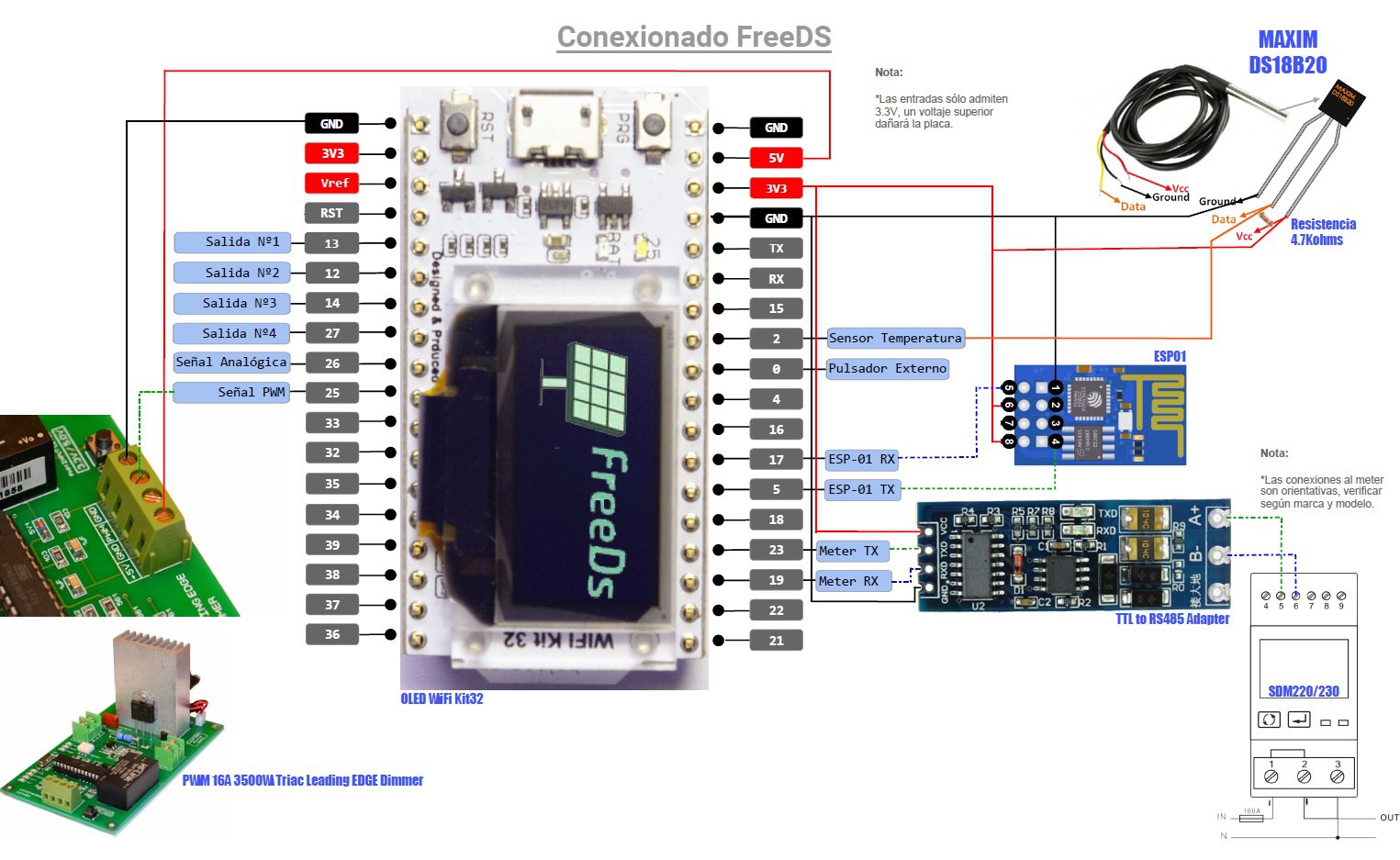
Below we show the assembly of all components (Meter, Modbus Converter, ESP32, ESP01, Dimmer and relay board). It is important to assemble only the parts required for the working mode you want to implement, including optional components if needed.

It is not necessary to assemble all elements shown, although full assembly is possible if you want to test all modes.

Note: See the Hardware section table for more details.

Assembly Diagram
Configuration

Getting Started

Initial Preparation

For initial setup, it is not necessary to connect the power stage (dimmer).

1

Power Supply

Power the ESP32 either via USB or through the supply provided by the dimmer board.

2

Welcome Screen

At startup, the ESP32 OLED screen displays a welcome screen followed by an invitation to connect via WiFi.

3

WiFi Connection

Connect to the "FreeDS" WiFi network and open 192.168.4.1 in your browser to configure.

4

Configuration

Select your home WiFi network from the SSID list, enter the password, and click "Save".

💡 Factory Reset: If WiFi is configured incorrectly, reset the ESP32 to factory settings by holding the "PRG" button (located on the ESP32 board at the upper-left side of the OLED display) for more than 20 seconds.

Web Configuration

Once connected to your network, the ESP32 will show its IP address. Open that address in your browser to access the configuration panel.

User and password: use "admin" for both

📖

Complete Documentation

For detailed instructions on FreeDS setup and usage, see the full user manual:

📄 Online User Manual

Ready to Start?

Download the latest FreeDS version and start managing your photovoltaic surplus intelligently.

Loading builds by device...